What Is a Landscaping CRM?
A landscaping CRM keeps the customer, the property, the quote, the visit, and the invoice on one trail. A contact list does not.
By Verdis4 min read

A landscaping CRM is the record where a customer, the property, the quote, the visit, and the invoice stay attached. A contact list is not that. A spreadsheet of names is not that. A calendar entry that says Smith on Tuesday is not that. If those pieces live in different places, you do not have a system. You have a pile you reassemble every time the crew calls.
Three kinds of software, three jobs
The graphic compares tools by what they are built to hold. It is not a ranking, and it does not invent a score. A product can do more than one of these jobs. The question is which job it was built around, because that is the job it will do without you babysitting a notes field.
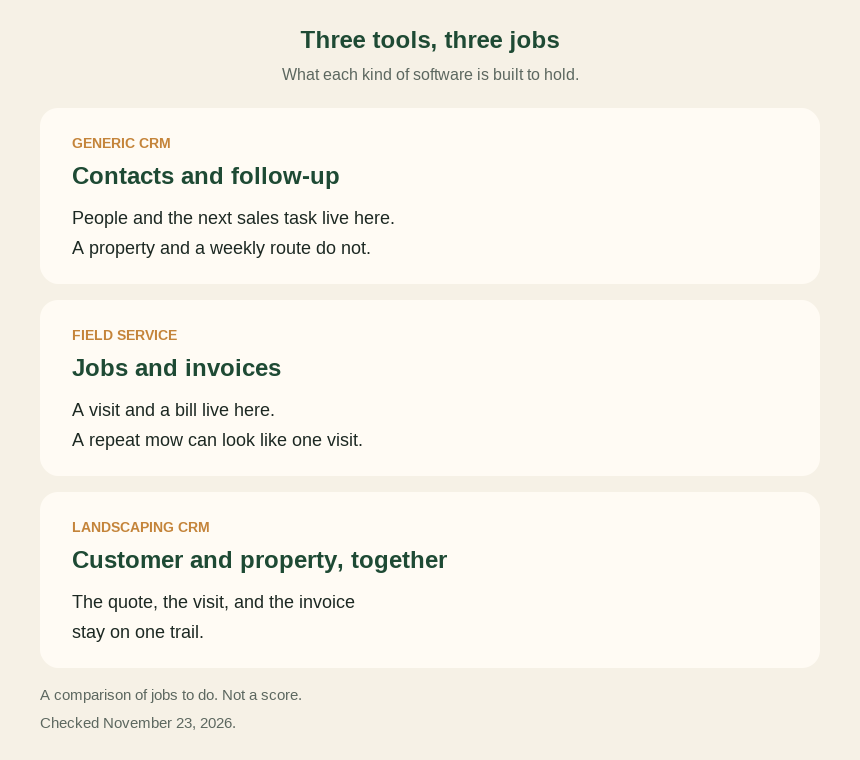
A generic CRM is built for a sales office. It holds people and the next follow-up. It does not know that one customer can have two properties, that the gate code is not the billing address, or that a weekly mow is a different kind of work from a patio. You can store those facts in a notes field. You will be the person who remembers to look.
A field-service tool is built for trades that book a visit and leave. It holds jobs and invoices. That is closer. It can still treat every lawn as a one-off ticket, with no property in the middle and no next visit already on the calendar. A company that runs routes and installs will feel that gap the first week the office and the crew disagree about what was sold.
A landscaping CRM is the layer that keeps both kinds of work on the same customer, with the property between the person who pays and the place you service. The quote should become the job without retyping the lines. The crew should see the visit, the notes, and what was approved. The invoice should match that approval. Sending the invoice should be a decision you make, not a side effect of checking a box. Repeat work should already know its next date.
What to require before you buy
Ask to see one trail, not a tour of screens. The customer and the property are separate records, because the person who pays is not always the place you mow. A quote can become the job. The crew can open the visit without calling you for the gate code. Recurring work has a next date. One-time work has an end. The invoice is tied to the work that was approved, and it stays a draft until someone sends it.
Do not require a promise that the tool will run the company. Do not require a chart of other people's close rates. Do not require a claim that you will be quoting before you have walked the property. If a vendor cannot show the customer, the property, the quote, the visit, and the invoice on one trail, the rest of the demo does not matter.
Signs you are still on a contact list
You re-explain the same job to your own office. You cannot list the open quotes without opening five message threads. A new crew lead cannot find the property notes. The invoice does not match the quote the client accepted, and nobody can see which version was approved. None of those needs a benchmark. Each one is a trail that broke.
The problems a landscaping CRM should take off the table are the ones that show up on a Tuesday morning. Which quotes are still open. Which property the new person is walking into. What the client already approved. What still has to be billed. A contact list can hold the phone number. It cannot hold that chain.
How Verdis keeps that trail
Verdis keeps the customer and the property with the quote, the job, and the invoice. When a client accepts a one-time quote, Verdis creates a job and a draft invoice. You review the draft and send it when you choose Send by Email or Send by Text. Completing the visit does not send the invoice and does not charge a card. For repeating work, service plans on Growth and Canopy are reviewed in Billing. You select the eligible visits, review the lines, and create a draft. Sending remains your decision. Seed includes quotes, one-time jobs, and invoices. Recurring service plans are not on Seed.
That is a landscaping-shaped trail. It is not a claim that every product with a lawn in the logo does the same thing. It is not a claim that the software writes your prices or your routes. The buyer's guide is the list of questions to ask any vendor, including this one.
Onboard a client without a scavenger hunt
The onboarding checklist is the paper version of the same trail: who pays, where the property is, what was sold, and how the next visit gets billed. If the software cannot hold those answers, the checklist will not survive the first busy week.