Comparison by Verdis · Updated November 2026

The best landscaping CRM depends on your company. Here are seven.

Verdis

Starts at $69 a month

There is no per-user fee, and lawn measurement is included.

Start free trial

14 days free. Card required. No charge until your trial ends. Cancel before billing begins.

That price is the Seed plan, for up to 50 customers. See pricing

We compare Verdis, Jobber, LMN, Service Autopilot, Yardbook, Housecall Pro and Aspire on published price, trial terms and who each says it is for.

Jump to the comparison

Start here

Which one fits your situation.

These follow what each company says about its own product. They are in no particular order.

Landscaping only, quoting by area, no per-user fee
VerdisSeed is $69 a month with no per-user fee, and lawn measurement is included.
One person, lowest published price
JobberCore is $29 a month for one user when billed annually.
Nothing to spend yet
YardbookSign-up is free.
Several employees, pricing from a budget
LMNBudgeting and job costing are what its plans are built around.
Dense routes and automations
Service AutopilotIt lists route optimization, and automations start on Pro Plus.
Several trades, not only landscaping
Jobber or Housecall ProBoth serve many home service trades.
A large company with an office team
AspireIt says it is designed for enterprise-level landscape businesses.

Side by side

Published price, trial and users.

Regular prices as published on November 24, 2026. Promotions are left out. "Not published" means the company's site did not print it.

  • Verdis
    Starting price:
    $69/mo, or $703.80/yr
    Trial:
    14 days. Card required.
    Users:
    No per-user fee
  • Jobber
    Starting price:
    $29/mo billed annually, or $49/mo with no commitment (Core, 1 user)
    Trial:
    14 days. No card.
    Users:
    Priced by plan and team size
  • LMN
    Starting price:
    From $297/mo (Starter), after a one-time onboarding fee
    Trial:
    Demo. No free trial is mentioned on the pricing page.
    Users:
    Starter includes 1 office or crew-lead license and 5 crew licenses
  • Service Autopilot
    Starting price:
    $49/mo (Startup), on an annual subscription, plus a sign-up fee
    Trial:
    Self sign-up on Startup. Demo on higher plans.
    Users:
    Startup includes 1 business user and 1 mobile license
  • Yardbook
    Starting price:
    Free to sign up. No price list is published on the site.
    Trial:
    Not needed. Sign-up is free.
    Users:
    Not published
  • Housecall Pro
    Starting price:
    Not shown until you answer questions about your trade, team size and goals
    Trial:
    14 days. No card.
    Users:
    Asked during pricing
  • Aspire
    Starting price:
    Not published
    Trial:
    Demo
    Users:
    "No limits on users"

One at a time

What each company publishes.

Verdis

Landscaping only. Quotes, jobs, schedule and invoices for an owner who still runs the work. We make it.

In its own words: For an owner working alone, and for a company with crews.

  • Seed is $69 a month and covers customers, quotes, jobs and invoices for up to 50 customers. Growth is $129 a month and adds recurring service plans and the Groundwork crew app. Canopy is priced on request.
  • TurfTrace measures a lawn from satellite imagery and is included on every plan.
  • Customers sign a quote on their phone to accept it.
  • There is no per-user fee. Each plan includes a set number of users.
  • It runs in the browser on a phone, tablet or computer.

Pick it if: You do landscaping or lawn care, you quote by area, and you want the quote, the job and the invoice connected without paying per person.

Look elsewhere if: You need QuickBooks Online sync today (ours is in pilot), a free plan, a trial with no card, payroll processing, or construction progress billing and retainage.

Source:Verdis pricing

Start a Verdis trial 14 days free. Card required. No charge until your trial ends.

Jobber

Field service software for many trades, landscaping among them.

In its own words: "For the pro who wants to build and grow their business on one easy-to-use platform." (Core)

  • For one user: Core is $29 a month billed annually or $49 with no commitment. Connect is $99 or $139. Grow is $149 or $199.
  • For a team of 2 to 5, Connect is $199 a month with no commitment and includes 5 users.
  • The 14-day trial gives access to the Grow plan's features and asks for no credit card.
  • QuickBooks Online sync is listed on Connect and above.
  • Add-ons are priced separately: Marketing Suite $99 a month, Receptionist $99 a month, Pipeline $49 a month.

Pick it if: You work alone and want the lowest published starting price, you do more than landscaping, or you need QuickBooks Online sync now.

Look elsewhere if: Your team is growing and you would rather not have the price change with headcount.

Source:Jobber pricing

LMN

Landscape business software built around budgeting, estimating and job costing.

In its own words: "For companies with less than 10 employees" (Starter) and "companies with 10+ employees" (Professional)

  • Starter starts at $297 a month and Professional at $648 a month, billed monthly. Enterprise is priced by sales.
  • Both prices come after a one-time onboarding fee. The amount is not published.
  • Professional includes 3 office or crew-lead licenses and 15 crew licenses. More licenses cost extra; the rate is not published.
  • Starter lists budgeting, estimating, scheduling, the LMN Crew app, and invoicing and payments. Professional adds real-time job costing.
  • QuickBooks integration is Online only on Starter, and Online and Desktop on Professional.

Pick it if: You have several employees and want to build prices from a budget and track job costs against it.

Look elsewhere if: You work alone or with one helper, or you want to try the software yourself before talking to sales.

Source:LMN pricing

Service Autopilot

Scheduling, routing and automation for service businesses, with lawn care and snow features.

In its own words: "Start growing your business." (Startup)

  • Startup is $49 a month, Pro $199 and Pro Plus $499. Elite is priced on request. The page says all pricing is based on annual subscription rates.
  • Each plan shows "+ sign up fee". The amount is not published.
  • Lead tracking, chemical tracking and snow dispatch start on Pro. Route optimization is on the feature list.
  • Automations start on Pro Plus, which includes 5 mobile licenses and 1 business user.
  • QuickBooks integration is included on Elite and listed as "Call for pricing" on Pro and Pro Plus.

Pick it if: You run dense lawn care or snow routes and want route optimization and automations.

Look elsewhere if: You want month-to-month billing or the whole price printed before you sign up.

Source:Service Autopilot pricing

Yardbook

Landscaping business software that is free to sign up for.

In its own words: "Run and grow your landscaping business"

  • The site offers free sign-up and says over 20,000 companies use Yardbook.
  • It lists estimates, job scheduling, routing, timesheets, invoices and payments, expenses, equipment maintenance and chemical tracking.
  • We did not find a published price list for paid options.

Pick it if: You are starting out and want to spend nothing on software yet.

Look elsewhere if: You want published plans and terms before you move your customers in.

Source:Yardbook

Housecall Pro

Home service software for many trades, with landscaping and lawn as one of them.

In its own words: "Pricing that fits any crew, from solo ops to full teams"

  • The pricing page shows a plan after three questions: your industry, your team size and your goals.
  • The trial is 14 days with no credit card.
  • Every plan lists live phone and chat support, a mobile app for iOS and Android, an app in English and Spanish, and card processing "as low as 2.59%".

Pick it if: You offer several home services, not only landscaping, and want an app-store app for the crew.

Look elsewhere if: You want to compare a printed price before giving your details.

Source:Housecall Pro pricing

Aspire

Business management software for large landscape companies.

In its own words: "Designed for enterprise-level landscape businesses"

  • Aspire's plans page lists no prices.
  • It says there are no limits on users, with 1:1 implementation and a dedicated customer success manager.
  • The feature list includes estimating, purchasing, inventory, scheduling, job costing, invoicing and accounts receivable, and a subcontractor portal.
  • Aspire also offers Crew Control, which it describes as lightweight tools for small to medium businesses.

Pick it if: You run a large company with an office team, purchasing, inventory and subcontractors to manage.

Look elsewhere if: You are a small company. Aspire says it is built for enterprise-level businesses.

Source:Aspire plans

How this was put together

What we checked, and what we did not.

Verdis wrote this page and is one of the seven products on it. We read each company's public pricing or plans page and wrote down what it printed: the price, the trial, the users included and who the company says the product is for. We did not find a pricing page on Yardbook's site, so we read its home page.

We did not test the other products, and we have no opinion here on how well they work. Reviews and scores are left out for the same reason. A demo and a trial with one real job will tell you more than any comparison page.

Prices change. Promotions are left out. Where a company does not print a number, we say so and do not estimate it. We reread the sources every quarter and when a company changes its page.

Use the same job in every trial

Six checks before you choose.

Pick a cleanup, mowing visit or aeration job you can price confidently. Work through these checks and note anything that needs a workaround.

  1. 01

    Start with a real customer

    Can you find the service address, property notes and existing work before preparing the next quote? Use a returning customer so you can spot missing context.

    See customer-to-work context
  2. 02

    Price a job you understand

    Use your own services, quantities and rates. Check whether measurements help, where private costs are entered and what the customer will actually see.

    Check estimating and costs
  3. 03

    Change the plan

    Move a job to another day and check the saved result. See what the crew can access and which customer communications still need your action.

    Explore scheduling
  4. 04

    Follow the money carefully

    Find the draft invoice. Check what creates it, what sends it and what counts as paid. For recurring work, review how completed visits become a bill.

    See invoicing boundaries
  5. 05

    Try it on the device you use

    Use your phone for the actions you take in the field. Check any desktop requirements, especially detailed costing, and the crew app's plan availability.

    See the crew workflow
  6. 06

    Check the whole cost and the help

    Compare monthly versus annual billing, customer limits, messaging allowances, overages and payment fees. Understand the trial, cancellation and available support before moving records.

    Review plans and trial terms

Where Verdis fits

For the owner still running the work.

Verdis OneTouch connects customer and property context to quotes, jobs and invoices. TurfTrace supports area-based quoting. Groundwork gives crew members their assigned work and crew-hour workflows on Growth and Canopy.

The owner stays in control. An accepted one-time quote creates a job and draft invoice; scheduling and sending remain separate actions. Recurring service-plan visits have their own Billing review.

Follow one job in the product tour
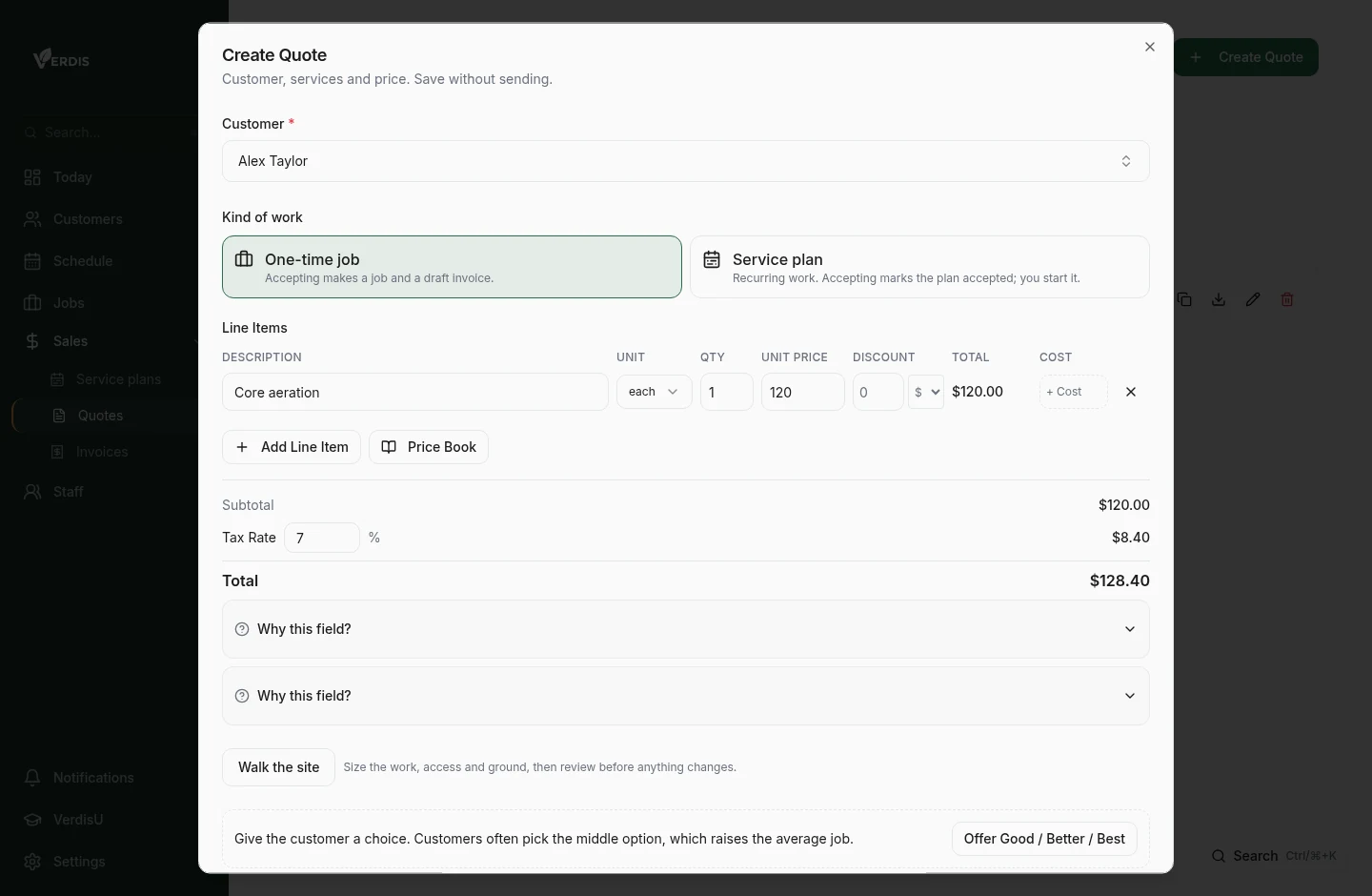
Actual Verdis quote editor with Alex Taylor, a core aeration service and its price, using example data
Desktop quote editor · Actual Verdis interface · Example dataOpen full-size image

Choose by the work you run

Start with one customer.
See whether it fits.

Try your own customers, quotes and one-time jobs on Seed. Choose Growth or Canopy if you need recurring service plans and Groundwork. Confirm specialised construction, accounting and integration requirements before committing.

See full plans and limits

Seed$69/month

Customers, quotes, one-time jobs and invoices. Up to 50 customers.

Annual: $703.80 billed yearly ($58.65/month equivalent). Save 15%.

Growth$129/month

Add recurring service plans, coordinate your crew and check your margins.

Annual: $1,315.80 billed yearly ($109.65/month equivalent). Save 15%.

Canopy: custom pricing. Check messaging allowances, overages and applicable payment fees on the pricing page. A card is required for the 14-day trial. Service plans are included on Growth and Canopy. We'll help you set up your first one.

Choose with the details clear.

What is the best CRM for a landscaping business?

It depends on your company. For one person who wants the lowest published price, Jobber Core is $29 a month billed annually. For a company with several employees that prices from a budget, LMN is built for that and starts at $297 a month. To spend nothing, Yardbook is free to sign up for. For landscaping-only work quoted by area with no per-user fee, Verdis starts at $69 a month. Large companies with an office team should look at Aspire.

How current are the prices on this page?

Every source page was read on November 24, 2026. Prices and plans change, and promotions are left out, so confirm on the company's own site before you buy.

Who is Verdis designed for?

Owners who still manage the work themselves and want customer details, quotes, jobs and invoices connected without adding unnecessary administration. Growth and Canopy add recurring service plans and Groundwork crew workflows.

When should I check for a different kind of system?

If your business depends on construction progress billing, retainage, specialised project accounting or a particular integration, confirm those requirements explicitly. Verdis does not process payroll payments, and automatic QuickBooks Online sync is not live.

Should I move all my customer records before testing?

No. Try one familiar customer and an upcoming job while keeping your current process running. Check the workflow before deciding what to move over.

What happens when I start the trial?

Enter your business name and email, choose a plan, then create your account with Google or email and complete verification when required. Add a card at checkout to start your 14-day trial. Your chosen plan begins billing after the trial unless you cancel. Manage your subscription through Settings → Billing → Manage subscription.

Do I need to move all my customers over?

No. Keep your current process running while you try Verdis with one customer and one upcoming one-time job. Once you’re comfortable, decide which customers and work to add next.

Support

Help comes from a person, on every plan.

Need a hand with your first quote, a service plan, or getting your crew set up? Get personal help by email or a scheduled phone or video call. Every plan includes a real person to turn to.
EmailScheduled phone or video
Arrange a personal walkthrough

Growth and Canopy add priority support; Canopy adds hands-on migration and direct founder support.

Try it with work you know

One customer. One upcoming job.
Your decision.

Keep your current process while you try Verdis. Check the details, follow the next step and decide what to move over.

Start free trial

14 days free. Card required. No charge until your trial ends. Cancel before billing begins.