CRM for Multi-Crew Landscaping Companies: What Breaks First
A second crew breaks the handoff before it breaks sales. Look at the record, the quote, the schedule, the instructions, and the hours. No published crew count says you must switch.
By Verdis4 min read
The solo guide was about one person holding the quote, the visit, and the invoice. This one starts the week a second crew leaves without you. The sales calendar can still look full. The break is that the job lived in your head, and your head is on the other truck.
Read the solo guide first if you are still the only one on the job
What breaks first
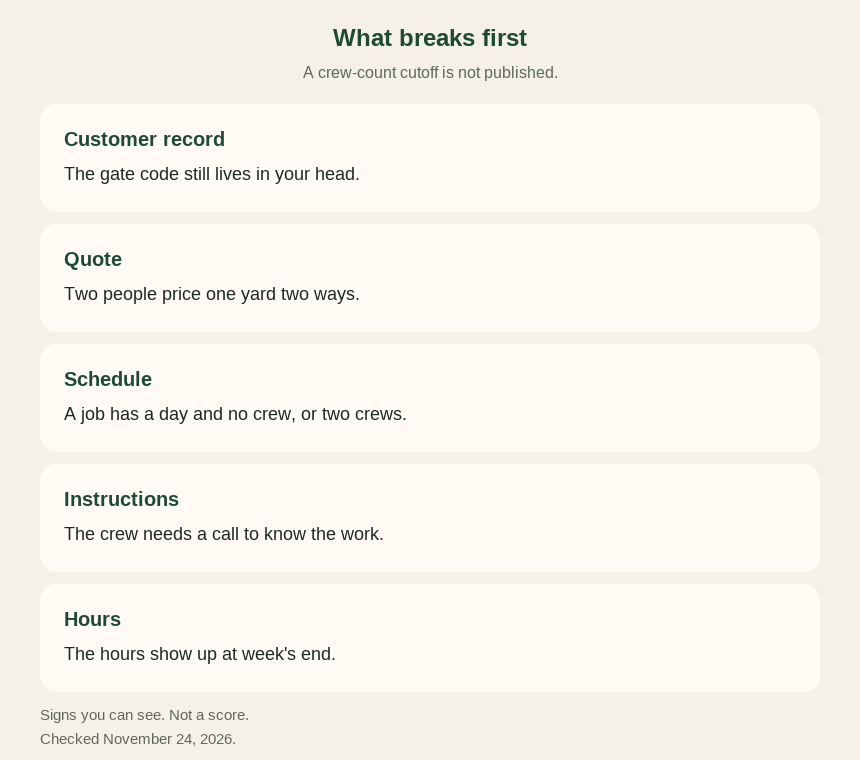
Five places show the crack before a lost sale does. A crew count that means you must buy software is not published. Two careful people can still run from a shared notebook. The graphic is the sign you can see, not a score.
The customer record
The second crew calls for the gate code, the dog, and which side of the house. If the answer is in a thread only you can open, the record already broke. The customer and the property have to be a place both crews can open, with the notes on that property rather than in your pocket.
The quote
Two people can price the same yard and write two numbers. TurfTrace traces the lawn over a satellite image, totals the square feet and the acres, and saves that measurement with the customer or the job. It is on every plan, at no extra cost. It is not a site survey. The image and the line you draw set the area. Access, obstacles, and what you see on the ground still set the price.
The customer can accept that quote without you in the driveway. The link in the quote email opens it with no password. They see the work, the tax, and the total, sign with a finger or a mouse, confirm their name, tick one box, and tap Sign and accept. Nothing is accepted before that tap. The quote then shows Signed, and Verdis keeps a frozen copy of what they accepted. Later price edits do not rewrite that copy. This is the quote itself, not a separate contract you email for signature. It works for a one-time quote and for a service-plan quote, on every plan.
See how a customer signs a quote on a phone
See how TurfTrace measures a lawn
The schedule
One-time scheduling is on every plan. You set the date and the crew, and the customer and the instructions stay on that job. Yards that repeat belong on a service plan, which you review before you activate it. Service plans are on Growth and Canopy. A calendar that only you can see is the piece that breaks. The fix is the job having a crew and a day, not a second app with its own list.
The instructions
Assigned work carries the customer, the place, and the instructions. Groundwork, on Growth and Canopy, adds the crew's field workspace, the time clock, and the staff workflows. That is how a job leaves your truck without a narration. If the crew still has to call you to learn what was sold, the handoff has not moved.
The hours
When someone else is paid for the hour, you need those hours where you can see them before Friday. Groundwork's time clock is that record, on Growth and Canopy. It does not run payroll. Pay still goes through the payroll process you already use. If you want a labor cost from your own wage and your own hours, use the crew labor calculator and type your numbers. This page will not guess them.
Use the crew labor calculator with your numbers
The job you are not standing on
Put the five breaks in the order a job actually moves when you are not there. Measure, or open the measurement you already saved. Send the quote and let them sign it on the phone. Put the crew on the job with the instructions attached. When the visit is done, the office reviews the draft invoice and sends it. Completing the visit does not send the invoice and does not charge a card.
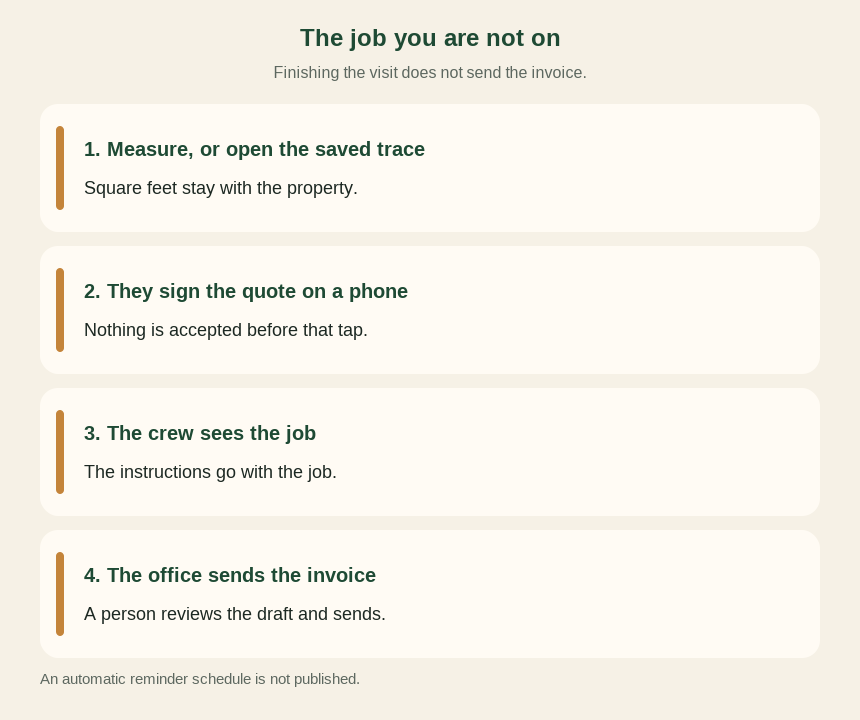
An overdue invoice is a filter, not a robot. Draft, sent, paid, and overdue are how you see which bill needs a person. You open the record and send the reminder when it is the right next step. Verdis does not publish an automatic reminder sequence, and this page will not invent one. Several people sending separate reminders is how a customer hears the same bill three times. One person owns the next follow-up.
What can stay light
Two crews do not need a headquarters. They need the record, the quote, the day, the instructions, and the hours to survive a morning you are not on both trucks. The landscaping CRM page is the wider tour. This page is only the week the second crew starts.